Troubleshooting Guide

An oil-free air compressor tripping on high temperature is one of the most common and most misdiagnosed service calls in compressed air maintenance. The overtemperature protection is doing exactly what it should — protecting the machine — but the underlying cause can be almost anything from a blocked cooler to an undersized compressor room. This guide walks through every cause in order of likelihood and gives you the diagnostic steps to identify and fix yours.

✦ 9 Root Causes Explained
✦ Diagnosis Checklist
✦ When to Call a Technician

Oil-free air compressor overheating causes diagnosis

Understanding the Overtemperature Protection System

Every modern oil-free rotary screw compressor has a thermal protection system — a temperature sensor in the compression element or discharge port that monitors operating temperature and triggers a controlled shutdown when a set point is exceeded. This is not a fault in itself; it is the machine working correctly to prevent damage to the compression element, motor windings, or drive electronics that would result from sustained operation above rated temperature.

The typical overtemperature shutdown setpoint for oil-free screw compressors is 105–120°C at the compression element discharge, depending on the manufacturer and model. For water-lubricated oil-free units, this threshold is typically lower (85–100°C) because the water injection keeps discharge temperatures considerably cooler than dry oil-free designs. An alarm warning typically appears 5–10°C below the trip setpoint, giving a brief window to reduce load or investigate before shutdown occurs.

Critically, the overtemperature event is a symptom, not the problem. The machine is hot because something in the thermal environment has changed — either the machine is generating more heat than usual, or the heat removal pathway has been compromised. Resetting the fault and restarting without identifying and fixing the underlying cause will result in repeated overtemperature shutdowns and, eventually, actual damage to the components the protection system was designed to save.

This guide addresses all nine primary causes of overtemperature in oil-free compressors, from the most common (inadequate room ventilation) to the less obvious (VSD drive fault causing excessive current draw). Work through the diagnostic checklist in order — the causes are arranged from most likely to least likely for a machine that was previously operating normally.

First Response: What to Check Before Calling for Service

Before assuming a component failure, spend 10 minutes on these immediate checks. These catch the majority of overtemperature causes and can often be resolved in minutes without any service call:

⚡ 10-Minute First Response Checklist
1

Read the discharge temperature on the controller display. Is it at or near the trip setpoint, or significantly below? A reading close to the setpoint with normal ambient conditions suggests a component issue. A reading near setpoint with an obviously hot room or blocked cooler suggests an environmental cause.
2

Check the compressor room temperature. Use a thermometer or read the ambient temperature sensor if the controller displays it. If room temperature is above 35°C, this alone could be the primary cause on a hot Australian summer day.
3

Inspect the aftercooler externally. Is it visibly blocked with dust, lint, or debris? Many aftercooler blockages are immediately visible as a layer of compacted dust on the cooling fins. A blocked cooler is the single most common and most easily fixed overtemperature cause.
4

Check the intake air filter indicator. If a pressure drop indicator is fitted, is it in the red zone? A heavily loaded intake filter restricts the cooling air drawn through the unit on air-cooled designs, and forces the compressor to work harder — both increasing heat generation and reducing cooling.
5

Verify ventilation paths are clear. Are all ventilation louvres and duct openings unobstructed? Have any boxes, materials, or equipment been stored against the unit since the last time it ran without issue? Is the exhaust duct (if fitted) clear at both ends?
6

Note when the overtemperature occurs. Does it happen immediately on start? After a specific running period? Only during peak summer afternoons? Only under heavy load? The timing pattern narrows the cause significantly.

The 9 Root Causes of Oil-Free Compressor Overheating
Cause 1 — Inadequate Room Ventilation
Most common cause ≈ 40% of cases

What happens: The compressor room temperature rises above the maximum allowable ambient for the machine (typically 40–45°C). As room temperature increases, the cooling air entering the compressor becomes less effective at removing compression heat. Discharge temperature rises progressively until it reaches the trip setpoint.

Why it happens: Ventilation was inadequate to begin with; seasonal summer conditions exceed ventilation design capacity; obstructions have been added to ventilation openings; the ventilation fan has failed or slowed; a heat source has been added to the room (new equipment); doors or windows that were part of the ventilation pathway have been sealed.

Diagnosis & Fix
🔍 Diagnose: Measure room temperature with a thermometer. If above 35°C: this is likely the cause. If below 30°C: look elsewhere.
🔧 Quick fix: Open all ventilation paths; remove obstructions; use a portable fan to move hot air away from the intake.
Permanent fix: Increase ventilation opening area; add powered exhaust fan; insulate roof; see ventilation design guide (Article 16).

Cause 2 — Blocked or Fouled Aftercooler
Very common ≈ 25% of cases

What happens: The aftercooler — the finned heat exchanger that removes compression heat from the discharged air — becomes blocked with accumulated dust, lint, oil mist (from nearby machinery), or in humid environments, biological growth. A 30% reduction in effective aftercooler area can cause a 15–25°C rise in discharge temperature.

Why it’s missed: The blockage builds gradually over months. The discharge temperature rises 1–2°C per week until it crosses the trip threshold — a rate too slow to notice without trending the data from the controller display.

Diagnosis & Fix
🔍 Diagnose: Inspect the cooler fins visually — blocked coolers are usually obvious. Shine a torch through the fins from one side; if light does not pass freely, cleaning is needed.
🔧 Fix: Blow out with dry compressed air from the clean side toward the dirty side. For stubborn fouling: wash with fin cleaner or low-pressure water and allow to dry completely before restart.
Prevention: Add cooler inspection (visual check) to the monthly maintenance schedule.

Cause 3 — Blocked Intake Air Filter
Common ≈ 15% of cases

What happens: The intake air filter removes particles before they enter the compression element. As it loads with dust, the restriction to airflow increases. For air-cooled compressors, the intake filter also supplies some of the cooling air drawn through the machine — a loaded filter reduces both intake volume (reducing FAD and increasing specific power) and cooling airflow (raising discharge temperature).

Compounding effect: A blocked filter forces the compressor to work harder to produce the same output pressure, increasing the heat generated per unit of air compressed — so the overheating effect is doubled: less cooling air in, more heat generated.

Diagnosis & Fix
🔍 Diagnose: Check the filter pressure drop indicator. If in the red zone, or if the element looks visibly dirty, this is the cause. Note the date of last replacement.
🔧 Fix: Replace the intake filter element — do not try to clean and re-use disposable elements. A new element costs AUD $30–150 and takes 10 minutes to replace.
Prevention: Replace on the manufacturer’s schedule (typically every 1,000–2,000 hours) or more frequently in dusty environments.

Cause 4 — Hot Air Recirculation (Intake Pulling Warm Exhaust)
Moderately common

The compressor intake draws from an area contaminated by its own warm exhaust air — either because the exhaust duct outlet is positioned near the intake, or because the machine has been repositioned and now faces into a dead-air corner. The intake temperature may be 10–20°C above ambient, significantly reducing cooling effectiveness.

Diagnose: Hold a thermometer near the intake while the machine runs — if intake temperature exceeds room ambient by more than 5°C, recirculation is occurring.
Fix: Reposition machine or install a sheet metal baffle to separate intake from exhaust zone; extend exhaust duct to discharge outside the building.
Cause 5 — Cooling Fan Failure or Reduced Speed
Moderately common

The internal cooling fan (or in ducted systems, the external exhaust fan) has failed, has a seized bearing, or has accumulated debris on the blades reducing flow. For VSD-equipped compressors where the cooling fan is powered from the VSD output, a drive fault can reduce fan speed without triggering a separate fan alarm.

Diagnose: Open the compressor enclosure (with machine running if safe to access) and listen/feel for fan operation. Verify fan blade condition visually — accumulated debris or bent blades are visible. Check fan amperage on the VSD display if applicable.
Fix: Clean or replace fan; replace fan motor if failed; repair or replace VSD output circuit; replace external exhaust fan.
Cause 6 — Water Cooling Circuit Issue (Water-Cooled Models)
Water-cooled models only

For water-cooled and water-lubricated oil-free compressors, cooling depends on adequate water flow at or below the specified inlet temperature. Causes include: cooling water supply pressure too low (flow below minimum); cooling tower inefficiency during summer (water inlet temperature too high); fouling inside the water-side of the heat exchanger reducing heat transfer; failed or closed cooling water valve; water pump failure. Water-lubricated compressors also need the injected water supply within specification — depleted or contaminated injection water raises compression temperatures directly.

Diagnose: Check cooling water inlet temperature and flow rate against manufacturer specification. Check water pressure at the inlet. For water-lubricated units, check injection water supply quality and flow.
Fix: Restore water supply conditions to specification; clean heat exchanger (chemical descale); repair pump or valve; treat or replace injection water.
Cause 7 — Compressor Running Continuously at or Near Full Load
Demand & sizing issue

An oil-free air compressor that is systematically under-sized for its application runs at or above 90% load factor continuously. Sustained high load increases heat generation and reduces the idle periods that normally allow temperatures to stabilise. The machine may operate within temperature limits at moderate ambient but trip during summer when ambient temperatures are higher and the thermal margin is already reduced. This issue often appears for the first time after production expansion adds demand without a corresponding compressor upgrade.

Diagnose: Check load factor on the controller display. If consistently above 85%, the compressor is under-sized for current demand. Check if the overheating only occurs after demand recently increased.
Fix: Add a second compressor to share the load; fix compressed air leaks to reduce demand; reduce operating pressure if the application allows.
Cause 8 — VSD Drive Fault Causing Excessive Motor Current
VSD models only

A variable speed drive compressor with a partially failing VSD drive may operate at incorrect motor flux levels — causing the motor to draw excessive current and generate abnormal heat even at moderate speeds. VSD capacitor degradation, incorrect motor parameter settings after a drive replacement, or partial IGBT failure can all cause this. The discharge temperature may appear normal while the motor body temperature is the actual overheating source — particularly if the temperature sensor is in the compression element rather than on the motor winding.

Diagnose: Check motor current on the VSD display at various speeds. Compare to the expected current from the motor nameplate at the same speed. Feel the motor body — it should be warm but not hot to touch at moderate ambient.
Fix: VSD parameter check and recalibration; VSD capacitor replacement; VSD module replacement. Requires a qualified electrician or VSD specialist.
Cause 9 — Worn Compression Element (Clearance Increase)
Older machines · Major service

In dry oil-free screw compressors with PTFE-coated rotors, the PTFE coating wears over years of operation — increasing the clearance between rotor tips and casing. This allows more internal air slippage (recirculation within the compression stage), meaning the compressor must work harder to achieve the same outlet pressure. The additional work done against internal slippage is converted directly to heat. This is a gradual degradation — usually noticeable as a combination of reduced FAD output and rising discharge temperature over a period of months to years.

Diagnose: Compare current FAD output to the commissioning baseline — if output has dropped 10–20% while running hours have increased, element wear is likely. Check maintenance records for rotor replacement history.
Fix: Compression element overhaul or replacement — a major service requiring a certified compressor technician. Typically due at 20,000–40,000 running hours for dry oil-free designs.

Oil-free compressor overheating diagnosis fix

Systematic Diagnosis: Match Symptoms to Cause

Use the discharge temperature reading and timing of the overtemperature event to narrow down the cause before working through the full checklist:

When overtemperature occurs Most likely cause(s) Check first
Only during summer afternoons / hot days Room ventilation insufficient for summer ambient (Cause 1) Room temperature thermometer
After gradual temperature rise over weeks/months Blocked aftercooler (Cause 2) or loaded intake filter (Cause 3) Visual cooler inspection; filter ΔP indicator
Shortly after start-up (within 15–30 min) Fan failure (Cause 5); water cooling fault (Cause 6) Fan operation check; cooling water flow/temp
Only when production demand is high Undersized for current demand (Cause 7) Controller load factor display; recent demand changes
Always at same temperature regardless of ambient Faulty temperature sensor; VSD fault (Cause 8) Compare sensor reading to contact thermometer; motor current check
Combined with reduced output pressure or flow Worn compression element (Cause 9); major intake restriction FAD output measurement vs commissioning baseline; running hours
After machine relocation Hot air recirculation (Cause 4); inadequate clearances to walls Intake temperature measurement; clearance verification

Preventing Overheating: The Maintenance Schedule That Keeps Temperatures Under Control

Most overtemperature events in oil-free compressors are preventable through consistent maintenance. The following schedule addresses the primary causes before they develop into a shutdown event:

📅 Monthly
  • → Visual inspection of aftercooler fins
  • → Record discharge temperature and compare to baseline
  • → Verify room temperature at midday (summer) or peak production
  • → Check all ventilation openings clear
  • → Log controller discharge temperature reading
  • → Check intake filter ΔP indicator
📅 Every 6 Months
  • → Replace intake air filter element (or by hours — whichever first)
  • → Clean aftercooler fins with compressed air
  • → Check cooling fan blade condition and bearing
  • → For water-cooled: measure cooling water flow and inlet temperature
  • → Check VSD cooling fan condition (VSD models)
  • → Clean VSD enclosure ventilation filters
📅 Annual / By Hours
  • → Full service by certified technician
  • → Motor current measurement at rated load
  • → FAD output test vs commissioning baseline
  • → Temperature sensor calibration check
  • → Review trending data — identify gradually rising discharge temperature
  • → Review ventilation capacity against summer peak room temperature data

When to Stop Diagnosing and Call a Certified Technician

Many overtemperature causes — blocked coolers, dirty filters, ventilation problems — can be diagnosed and fixed by a competent maintenance person with no specialised compressor training. Others require a qualified compressor technician with diagnostic tools, calibration equipment, and replacement parts. Do not attempt field repair of the following:

🛑 Call a Technician Immediately If:
  • → Discharge temperature is elevated even after cleaning cooler and replacing filter and ventilation is adequate
  • → Motor body feels excessively hot to touch (above 60°C) independent of ambient temperature
  • → You can smell burning or hot plastic inside the enclosure
  • → The controller shows an error code alongside the overtemperature alarm
  • → Output FAD has dropped noticeably alongside the overtemperature condition
  • → VSD current readings are abnormally high at normal speed
  • → Machine has more than 20,000 hours and has never had an element overhaul
✅ Handle In-House (Competent Maintenance Person):
  • → Cleaning blocked aftercooler fins
  • → Replacing intake filter element
  • → Opening ventilation paths; removing obstructions
  • → Identifying and removing hot air recirculation pathway
  • → Checking and restoring cooling water supply (temperature and flow)
  • → Cleaning external ventilation fan blades of debris
  • → Checking and clearing condensate drain

Service & Support from Australia Oil Free Air Compressor

Australia Oil Free Air Compressor Co., Ltd. provides technical support for overtemperature faults on all oil-free compressor models we supply — including remote diagnosis assistance for maintenance teams who can access the controller display and perform basic checks. Our service network covers major Australian cities and regional industrial areas.

For units approaching major service milestones (element overhaul, rotor replacement), we provide planned service quotes that include a discharge temperature trend analysis — identifying whether the machine is operating efficiently or showing early wear signs. Preventive major service before a temperature-related breakdown is considerably cheaper than emergency call-out with parts on back-order.

Contact us at [email protected] with your compressor model, running hours, and the overtemperature symptoms for remote diagnostic assistance.
Oil-free compressor overheating service support

Upgrade Consideration

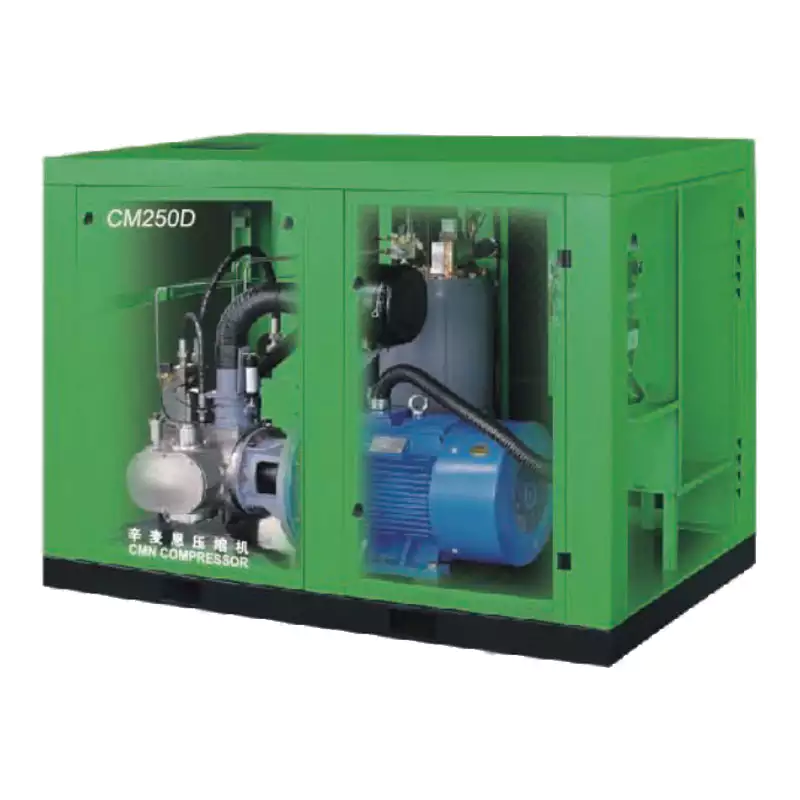
CM45D — Water-Lubricated Oil-Free Screw Compressor: Lower Discharge Temperatures by Design
CM45D oil-free compressor lower discharge temperatures

If your current dry oil-free compressor has a chronic overtemperature problem that cannot be resolved through maintenance improvements, the underlying physics may be the issue — dry oil-free screw machines discharge air at 150–200°C, close to the temperature trip setpoint in an already-warm environment. Water-lubricated compressors like the CM45D inject water into the compression chamber, cooling discharged air to 40–60°C — 100°C lower than a dry design. This dramatically increases the thermal margin between operating discharge temperature and the overtemperature trip point, eliminating the sensitivity to ambient temperature that causes dry machines to trip on hot Australian summer afternoons while operating perfectly in winter.

View CM45D Specifications

Frequently Asked Questions

Is it safe to keep restarting an oil-free compressor that keeps tripping on overtemperature?
+
No — it is not safe and it will cause damage. The overtemperature protection exists to prevent damage to the compression element, motor windings, and drive electronics. Repeatedly restarting while the root cause is unresolved causes the machine to thermally cycle rapidly — the stresses of repeated heat-up and cool-down cycles damage bearings, seals, and element coatings faster than sustained overtemperature alone. If the machine trips within minutes of restart, it is critical to identify and fix the cause before attempting further operation. Identify which of the nine causes applies; address it; then restart with close monitoring of discharge temperature trend.
Can I raise the overtemperature trip setpoint to prevent shutdowns?
+
No — and most controllers do not allow this modification by operators for this reason. The overtemperature trip setpoint is set by the manufacturer at a level that protects the components from thermal damage. Raising it above the manufacturer’s limit risks permanent damage to the compression element, motor windings, and bearing lubricants (where present) — damage that is not covered under warranty and that renders the machine unreliable or permanently damaged. The correct response to repeated overtemperature trips is to resolve the underlying cause, not to disable the protection that is preventing more serious damage.
My compressor only overheats in summer — is this normal?
+
A compressor that operates without issue at 25°C ambient but trips at 40°C is telling you that its thermal margin — the gap between normal operating temperature and the trip setpoint — is very small. The cooling system is working at or near its maximum capacity even in cooler conditions. This is a ventilation design inadequacy for the Australian climate: the system was sized for average conditions, not for the worst-case summer day. The fact that it “only” happens in summer is not reassuring — it means the system is at its thermal limit every hot day and one more degree of ambient, one more layer of dust on the cooler, or one more percentage point of load will cause a production-disrupting shutdown. The summer overtemperature pattern is a clear indication that ventilation needs improvement, not that the current situation is acceptable.
How do I know if the temperature sensor itself is faulty rather than the machine actually overheating?
+
A faulty temperature sensor typically shows either: (1) a constant reading that doesn’t change with load or ambient — suggesting a failed sensor stuck at one value; or (2) erratic readings that jump significantly between readings — suggesting a poor connection or damaged sensor. If the sensor reading is 5–10°C above or below what you’d expect given the ambient temperature and load conditions, compare it against an externally placed contact thermometer on the discharge pipe near the sensor location. A significant difference (more than 5–10°C) between the two readings suggests sensor calibration error or failure. Sensor replacement is a straightforward maintenance task — contact the manufacturer for the correct part number and replacement procedure.
Does a two-stage oil-free compressor run cooler than a single-stage?
+
Yes — for the same final outlet pressure, a two stage air compressor divides the compression work into two stages with an intercooler between them. Each stage operates over a lower pressure ratio, resulting in lower discharge temperature per stage. The intercooler removes compression heat between stages, so the second stage inlet temperature is close to ambient rather than the elevated temperature of a single-stage discharge. This results in a significantly lower final discharge temperature for equivalent outlet pressure — and a correspondingly larger margin to the overtemperature trip setpoint. Two-stage designs are therefore inherently more resistant to overtemperature events than single-stage equivalents at the same final pressure.

Australia Oil Free Air Compressor Co., Ltd.

Charlton Industrial Area, Australia  |  [email protected]

Get Technical Support for My Overheating Compressor